

Online invoice generator
A free tool to create your invoice online professionally, strictly complying with the Tax Agency's regulations and avoiding mistakes that could lead to penalties.
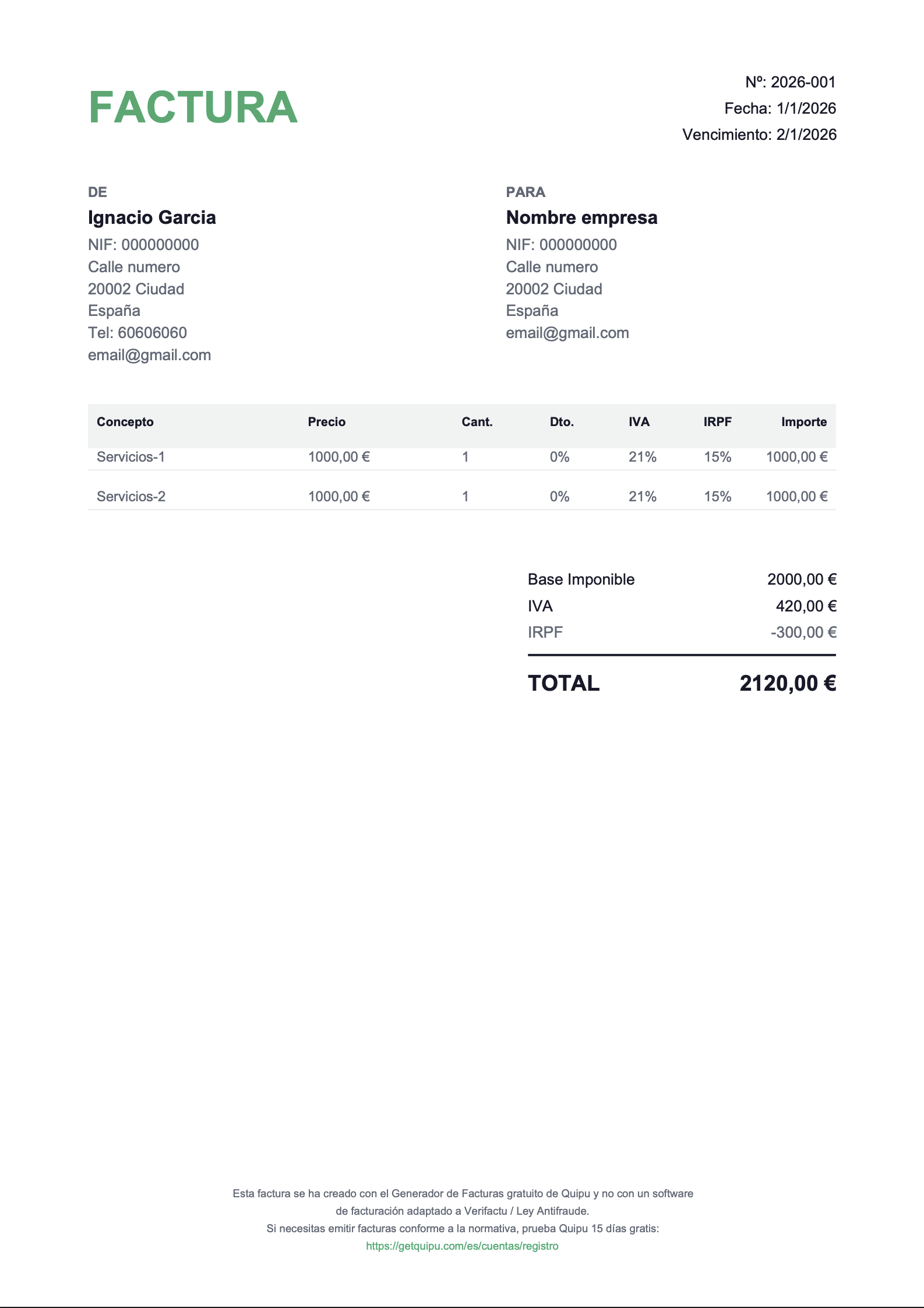
Essential details you need to know to generate invoices online
The Invoicing Regulation (Royal Decree 1619/2012) sets out what an invoice must contain to be valid. If you use software, these fields are usually automatic, but it's vital that you check them:
-
Number and series: Numbering must be sequential and without gaps (e.g. 2025-001, 2025-002). You can't issue invoice 50 before 49. of a div block.
-
Issue date: The day you issue the invoice.
-
Transaction date (Accrual): Only if it differs from the issue date (for example, if you invoice today for a service provided last month).
-
Tax details of the issuer and recipient: Full name or company name, NIF/CIF and registered tax address.
-
Description of the transactions: A clear description of the service or product to determine the taxable base.
-
Taxable base: The amount before taxes.
-
VAT rate: You must apply the current rate that corresponds to your product or service (standard, reduced or super-reduced) or state the exemption if applicable.
-
Tax amount: The exact amount of money corresponding to VAT.
-
IRPF withholding (if applicable): If you're a self-employed professional invoicing another company or freelancer, you must deduct the IRPF percentage that matches your tax registration status. See IRPF tables and brackets
-
Total amount due: The final sum.
What do our users think?
+20,000 freelancers and businesses use Quipu every day

+150 five-star reviews on

Frequently Asked Questions
Issuing invoices comes with tax registration and fiscal obligations. Although there are very specific exceptions in case law regarding regularity, the AEAT's general rule requires registration in the Register of Businesses (Form 036 / Form 037) to carry out economic activities. We recommend checking your situation with an advisor to avoid penalties for undeclared work.
No. A pro forma invoice is a draft or preliminary quote that has no fiscal or accounting validity and should not be numbered within the official invoice series. Only the final invoice creates an obligation to pay taxes.
It's common practice to start a new series each tax year. For example, the first invoice of 2025 would be 2025/001. This helps keep things organized and maintain the sequential order required by regulations.
For invoices sent by email (PDF), a handwritten signature isn't a strict requirement as long as the authenticity of the origin and the integrity of the content are guaranteed through other management methods. However, for structured electronic invoicing, digital certificates are used to guarantee that authenticity.
Yes, you can issue an invoice without VAT but only in specific cases: exempt operations (for example, certain healthcare or educational services), exports, or intra-community services with reverse charge, among others. In these cases, it's usually advisable to state the reason (e.g., “VAT-exempt operation” or a legal reference) to avoid confusion.
It usually applies when you invoice professional services to companies or freelancers (not to individuals). The percentage depends on the case (for example, the standard rate or the reduced rate for new freelancers in certain situations). If you're not sure, it's best to check with your advisor, since this is one of the most commonly misconfigured settings.
Yes. The key is to identify whether the client is a company or an individual and whether they're in the EU or outside the EU, since this changes the VAT treatment (Spanish VAT, exempt, reverse charge, etc.). A generator can help you with templates, but the tax rule depends on the case.
We define a reverse charge invoice as one where the issuer doesn't charge VAT; instead, the recipient declares it (typical in intra-community B2B operations and in some sectors). In practice, the invoice is usually issued “without VAT” with a note indicating the reverse charge.
A full invoice includes all the client's tax details and the complete breakdown. A simplified invoice (similar to a receipt) is used for small amounts and certain shops/services, but it has limits and isn't always valid for deducting taxes if it doesn't include the recipient's details when required.
Yes. In that case, the client's NIF/CIF isn't usually “mandatory,” but it's a good idea to include their name and address if the client requests it or if it's advisable given the type of operation. VAT (if applicable) still applies the same way.
The correct approach is to issue a corrective invoice (not “delete” or renumber it). The corrective invoice adjusts amounts, VAT, client details, or line items, and must be clearly identified and linked to the original invoice.
You can invoice in another currency, but it's highly recommended to clearly show the total and, if applicable, the exchange rate or the euro equivalent when it's relevant for your taxes or bookkeeping.
It's not always mandatory, but it's highly recommended: method (transfer, card, cash), due date (deadline), IBAN, and reference. It helps avoid missed payments “out of forgetfulness” and reduces back-and-forth with the client.
The numbering must be sequential. If there's a gap, you should be able to justify it (for example, a properly documented cancelled invoice) or issue a corrective/cancellation invoice as appropriate. In your tool, this is solved by avoiding the deletion of issued invoices.
Still have questions?
Get all your questions answered by our specialists
One solution all-in-one tailored to every business

Freelancers
Invoice in 30s and upload receipts with a photo. Save more than 20h a month.

Companies
Centralize all your financial information on a single platform.

Accountants
Manage your entire client portfolio without quarterly peaks. Reduce errors by 90%
Sign up now and get
50% off
3 months
Starter
Invoicing for businesses just starting out
8,5€
/ month
17,0 € Save €25.5 over 3 months
Includes:
VeriFactu-ready
30 automatic scanner reads/month
Unlimited invoices and quotes
Tax forecasting
Mobile app
Email support
Genius AI
Solution
Automate your invoicing management
15€
/ month
30,0 € Save €45.0 over 3 months
Includes:
Everything in the Starter
VeriFactu-ready
250 automatic scanner reads/month
Bank connection and reconciliation
Orders and delivery notes
Payroll importer
Integrations and API
Chat and phone support
Genius AI PRO
Premium
Full control of your business cash flow
29,5€
/ month
59,0 € Save €88.5 over 3 months
Includes:
Everything in the Solution
VeriFactu-ready
350 automatic scanner reads/month
Automatic bank reconciliation
Bank remittances
Analytics and projects
Cash flow dashboard
Unlimited scenarios and forecasts
Automatic transaction categorisation
Explore our plans and pricing in detail
Are you an accounting firm?
Discover the all-in-one solution for accounting firms and request a tailored proposal for your practice.
Enjoy a support
close and personal

Ask via chat
Easily ask our agents through our interactive chat.

Video Academy
Get the most out of all the solutions Quipu offers to grow your business.

Help centre
Get detailed answers to frequently asked questions about the platform.
Transform your business
invoicing now
No commitment, no hassle, and with total flexibility.


