

Digitalize your receipts and invoices in seconds
Deduct all your expenses easily thanks to the most reliable OCR on the market, which records all your receipts and invoices automatically and error-free.

The most reliable OCR reader
on the market
We offer 99.9% reliability thanks to the combination of AI, machine learning and human validation.
Upload your invoices and receipts
Upload documents from any device—whether using the mobile app, dragging files from your computer or sending them by email.
AI extracts the data from the document
Our artificial intelligence extracts information with pinpoint precision—forget about entering data manually.
You have the final word
Validate the digitized document in a single click and it will be automatically recorded in the system.
What makes us different?
Our OCR reader offers features that make it unique on the market, letting you automate processes and save time.
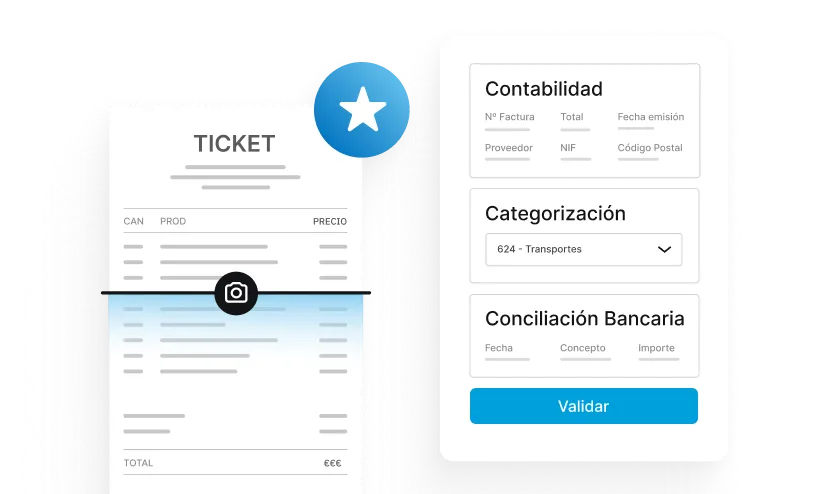
The most reliable OCR on the market
The combination of AI and human validation guarantees you 99.9% reliability.
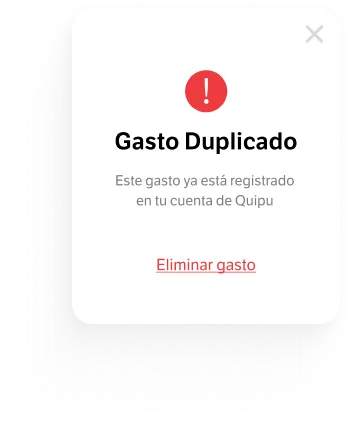
Duplicate detection
It detects duplicate documents, preventing errors in numbering, reconciliation and tax filing.
Automatic reconciliations
Quipu makes smart reconciliation suggestions and you simply validate them in one click.
Accounting entry assignment
The system detects your clients and suppliers and automatically links the accounting entries to the document.
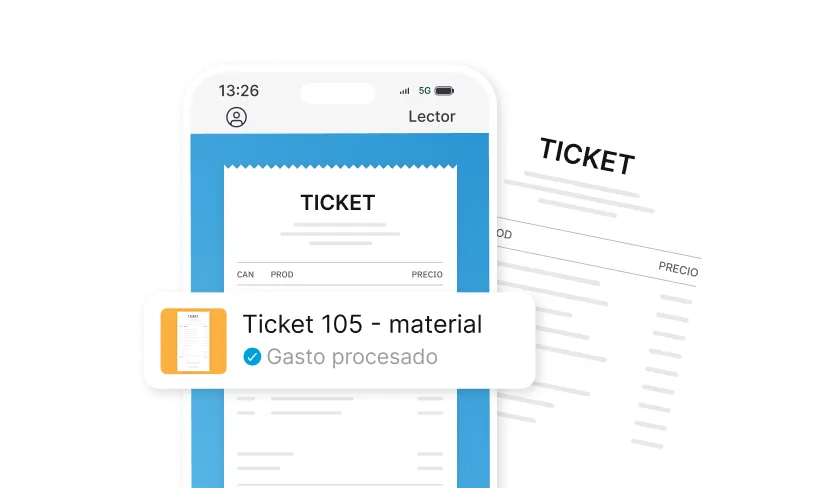
Do your accounting from anywhere
Record any expense receipt wherever you are with our mobile app.
Discover how our reader works in 2 minutes
Digitize invoices and receipts automatically, easily and error-free, deduct all your expenses, comply with regulations and avoid penalties.
One solution all-in-one tailored to every business

Freelancers
Invoice in 30s and upload receipts with a photo. Save more than 20h a month.

Companies
Centralize all your financial information on a single platform.

Accountants
Manage your entire client portfolio without quarterly peaks. Reduce errors by 90%
What do our users think?
+20,000 freelancers and businesses use Quipu every day

+150 five-star reviews on

Your invoices are generated automatically
Connect your online store, CRM, or payment gateway and let Quipu generate invoices automatically.








Sign up now and get
50% off
3 months
Starter
Invoicing for businesses just starting out
8,5€
/ month
17,0 € Save €25.5 over 3 months
Includes:
VeriFactu-ready
30 automatic scanner reads/month
Unlimited invoices and quotes
Tax forecasting
Mobile app
Email support
Genius AI
Solution
Automate your invoicing management
15€
/ month
30,0 € Save €45.0 over 3 months
Includes:
Everything in the Starter
VeriFactu-ready
250 automatic scanner reads/month
Bank connection and reconciliation
Orders and delivery notes
Payroll importer
Integrations and API
Chat and phone support
Genius AI PRO
Premium
Full control of your business cash flow
29,5€
/ month
59,0 € Save €88.5 over 3 months
Includes:
Everything in the Solution
VeriFactu-ready
350 automatic scanner reads/month
Automatic bank reconciliation
Bank remittances
Analytics and projects
Cash flow dashboard
Unlimited scenarios and forecasts
Automatic transaction categorisation
Explore our plans and pricing in detail
Are you an accounting firm?
Discover the all-in-one solution for accounting firms and request a tailored proposal for your practice.
Frequently Asked Questions
1. Upload an image or PDF of the receipt or invoice to the program. You can take a photo and upload it to our mobile app. You can also attach the file directly from your computer or send it to the email address assigned to your Quipu account.
2. Quipu's technology analyzes the text areas and recognizes all the data. This way your receipts and invoices are processed automatically.
3. Some receipts and invoices are processed immediately (1-2 minutes) if the AI determines a data extraction reliability level close to 100%. Otherwise, our team of experts will check that the extracted data is correct (12-24h).
4. Digitized documents will appear in the "Pending verification" tab and you'll be able to review them to make sure everything is correct. You have the final word!
Documents that go through human validation take approximately 12-24h to be reviewed by our experts.
On the other hand, documents with a high confidence level in data extraction by our algorithm are processed immediately (1-2 minutes).
In addition, you can always "intercept the document" if it's in the human validation process: this way you can review the document and approve it immediately.
In some cases, our team of experts manually verifies the data extracted by the AI to correct any possible errors. This is how we ensure 99.9% reliability.
Quipu's reader can read both invoices and income and expense receipts.
The supported formats are PNG, JPG and PDF.
The number of documents you can digitize each month will depend on the subscription plan you choose.
- The Starter plan gives you 30 automatic reader scans/month.
- The Solution plan gives you 250 automatic reader scans/month
- The Premium plan gives you 350 automatic reader scans/month
During the trial period you get 10 free automatic scans. You can try the reader by entering here.
Still have questions?
Get all your questions answered by our specialists
Enjoy a support
close and personal

Ask via chat
Easily ask our agents through our interactive chat.

Video Academy
Get the most out of all the solutions Quipu offers to grow your business.

Help centre
Get detailed answers to frequently asked questions about the platform.
Transform your business
invoicing now
No commitment, no hassle, and with total flexibility.

We offer modern solutions so businesses can keep their information up to date, effortlessly, on an intuitive and complete platform.

Carrer Pere IV, 78-84, 6-5, 08005 Barcelona

support@getquipu.com

935 245 580

Monday to Thursday 9am-6pm and Friday 9am-3pm


